# Pythinker logo Pythinker Code ### *Think first, then code. Your terminal-native review-first AI engineering agent.* **Code reviewer ยท Security & vulnerability scanner ยท Root-cause debugger โ€” then code creator.** **Pythinker reads your repo, audits it, and only writes code after the analysis. All from the shell you already live in.**
[![PyPI](https://img.shields.io/pypi/v/pythinker-code?style=for-the-badge&logo=pypi&logoColor=white&color=2563eb&label=pythinker-code&cacheSeconds=60)](https://pypi.org/project/pythinker-code/) [![Python](https://img.shields.io/badge/Python-3.12%2B-3776ab?style=for-the-badge&logo=python&logoColor=white)](https://github.com/mohamed-elkholy95/Pythinker-Code/blob/main/pyproject.toml) [![License: Apache-2.0](https://img.shields.io/badge/License-Apache--2.0-16a34a.svg?style=for-the-badge)](https://github.com/mohamed-elkholy95/Pythinker-Code/blob/main/LICENSE) [![CI](https://img.shields.io/github/actions/workflow/status/mohamed-elkholy95/Pythinker-Code/ci-pythinker-cli.yml?branch=main&label=CI&style=for-the-badge&logo=githubactions&logoColor=white)](https://github.com/mohamed-elkholy95/Pythinker-Code/actions/workflows/ci-pythinker-cli.yml?query=branch%3Amain) [![Downloads](https://img.shields.io/pepy/dt/pythinker-code?cacheSeconds=300)](https://pepy.tech/projects/pythinker-code) [![Code style: Ruff](https://img.shields.io/badge/code%20style-ruff-f59e0b.svg?style=flat-square&logo=ruff&logoColor=white)](https://docs.astral.sh/ruff/) [![ACP ready](https://img.shields.io/badge/ACP-ready-7c3aed.svg?style=flat-square)](https://github.com/agentclientprotocol/agent-client-protocol) [![MCP tools](https://img.shields.io/badge/MCP-tools-0891b2.svg?style=flat-square)](https://modelcontextprotocol.io/) [![Homepage](https://img.shields.io/badge/home-pythinker.com-ec4899.svg?style=flat-square)](https://pythinker.com)






๐ŸŒ Website  ยท  โšก Quick Start  ยท  โœจ Features  ยท  ๐Ÿงฉ IDE Integration  ยท  ๐Ÿ”Œ MCP  ยท  ๐Ÿ” Privacy  ยท  ๐Ÿ› ๏ธ Develop

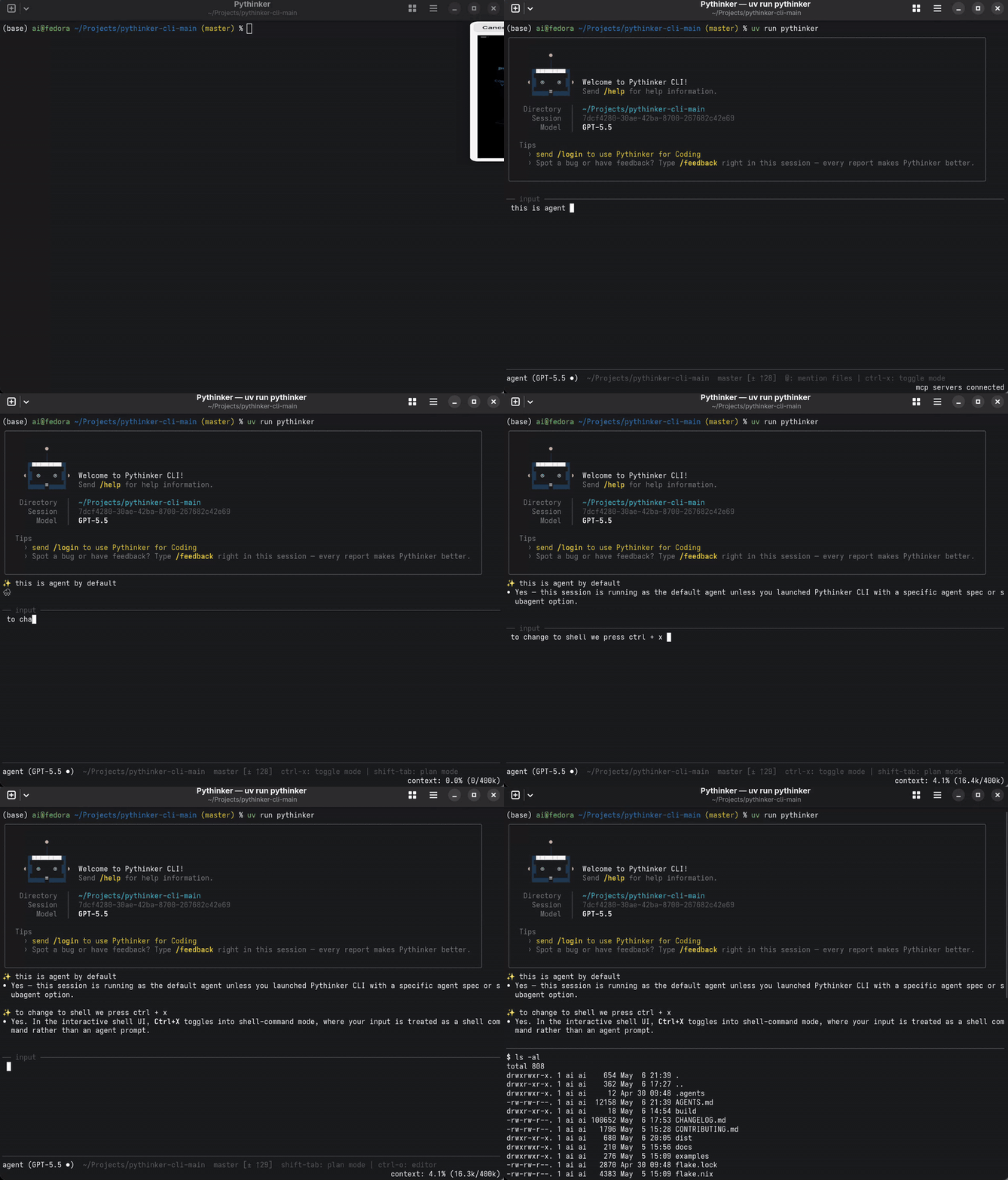
Pythinker Code terminal demo
--- ## ๐Ÿ’ก What is Pythinker? **Pythinker Code** is an open-source, **review-first** AI engineering agent that lives in your terminal. Before it writes a single line, it reads yours โ€” auditing diffs, scanning for vulnerabilities, and root-causing failures. Unlike chat assistants that jump straight to code, Pythinker leads with **code review, security scanning, and root-cause diagnosis**, and only edits files once the analysis points at a fix. It ships with first-class subagents for each role โ€” `code-reviewer` for severity-scored diff critique, `security-reviewer` for validated vulnerability findings, `debugger` for failure root-causing, and `coder`/`implementer` for the scoped edits that follow. All running in a single iterative loop, driven by the model of your choice, with full access to **your repo, the shell, the web, and MCP tools**. It speaks the [**Agent Client Protocol (ACP)**](https://github.com/agentclientprotocol/agent-client-protocol), so it slots cleanly into ACP-aware editors like Zed and JetBrains. It loads [**Model Context Protocol (MCP)**](https://modelcontextprotocol.io/) servers, so the same tools your other agents use just work. And it's hackable: subagents, skills, hooks, and plugins are all first-class extension points. > ๐ŸŽฏ **Review ยท Secure ยท Diagnose ยท then Create.** One agent, one shell, one workflow. No tab-switching. No context loss. No magic. --- ## ๐Ÿ†• What's New in 0.13.0 - **Native installers for macOS and Linux.** `brew install mohamed-elkholy95/pythinker/pythinker-code` works on both macOS (Intel + Apple Silicon) and Linux brew installs. Debian/Ubuntu users get `pythinker-code_0.13.0_.deb`, Fedora/RHEL/openSUSE users get `pythinker-code-0.13.0..rpm`, both built for `x86_64` and `aarch64`. Together with the Windows `PythinkerSetup-0.13.0.exe` shipped in 0.12.0, Pythinker now has a real native installer on every supported platform. - **Cross-OS `install-native.sh`.** `curl -fsSL .../install-native.sh | bash` auto-detects your OS + arch, verifies SHA-256, and lands `pythinker` at `~/.local/bin/`. The script is the no-package-manager fallback for containers and fresh VMs. - **Homebrew tap auto-publishes on every release.** A new tag-triggered workflow regenerates `Formula/pythinker-code.rb` (132 transitive deps enumerated automatically) and pushes it to [mohamed-elkholy95/homebrew-pythinker](https://github.com/mohamed-elkholy95/homebrew-pythinker). `brew upgrade pythinker-code` picks up new versions; no hand-curation per release. - **Frozen-binary fix for 0.12.0's installer.** The PyInstaller specs now bundle every `.md` / `.yaml` package data file (`prompts/`, `agents/`, `tools/*/description.md`, `skills/*/SKILL.md`). 0.12.0's Windows installer crashed on first prompt load โ€” **upgrade to 0.13.0** to fix it. - **Legacy install paths deprecated.** The helper shell scripts (`install.sh`, `install.ps1`), `uvx`, `uv tool install`, `pipx install`, and bare `pip install` keep working but are now flagged as legacy. README Quick Start leads with the per-OS native installer table. Set `PYTHINKER_INSTALL_QUIET_DEPRECATION=1` to silence the deprecation banner in the helper scripts. Upgrade with `pythinker update`, `pip install --upgrade pythinker-code==0.13.0`, or use the native installer for your platform from the [Releases page](https://github.com/mohamed-elkholy95/Pythinker-Code/releases/latest). --- ## โœจ Features
### ๐Ÿ–ฅ๏ธ Terminal-First Plan, edit, run, and verify without leaving your shell. Every action is visible, scriptable, and auditable. ### โšก Shell Command Mode Press `Ctrl-X` to drop into a direct shell prompt inside the agent. Run commands, then snap back into AI mode with full context preserved.
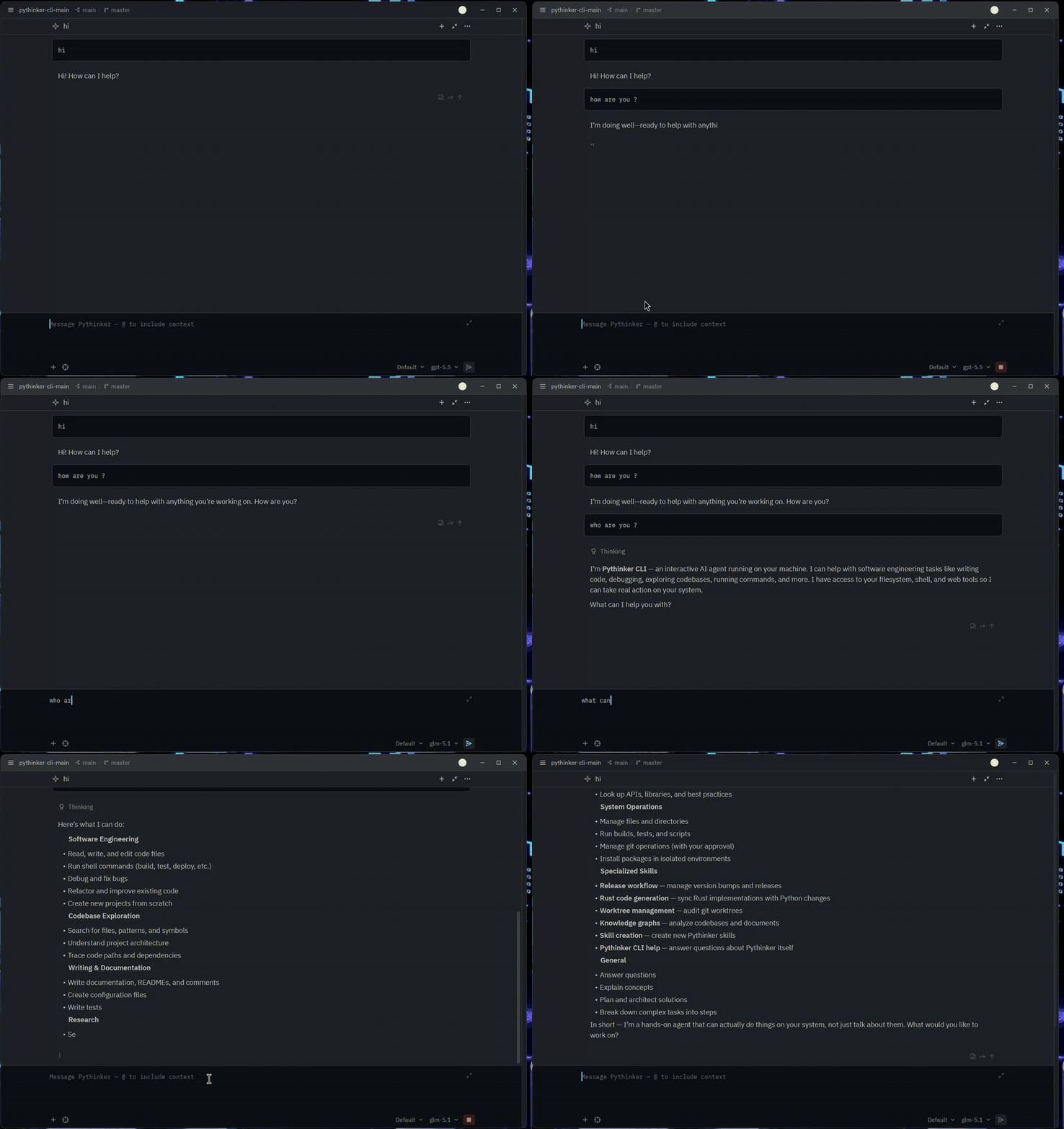
### ๐Ÿงฉ ACP IDE Integration Run `pythinker acp` and any [Agent Client Protocol](https://github.com/agentclientprotocol/agent-client-protocol) editor โ€” Zed, JetBrains, and more โ€” gets a full Pythinker session inline. ### ๐Ÿ”Œ MCP Tool Loading Manage stdio and HTTP MCP servers with `pythinker mcp`. OAuth-backed servers, persistent config, ad-hoc files โ€” all supported.
### ๐Ÿค– Subagents & Skills Delegate focused work to built-in subagents. Load reusable instructions via `/skill:` and bundled prompt flows via `/flow:`. ### ๐Ÿช Hooks & Plugins Observe or block tool execution with hook events. Install community extensions with `pythinker plugin`.
### ๐ŸŒ Web & Visualization UIs Optional web frontend and visualization frontend ship alongside the CLI for richer inspection workflows. ### ๐Ÿค– Bring Your Own Model Swap providers and models per-session: `--model openai/gpt-5.5`, hosted Pythinker models, or your own keys.
> [!NOTE] > Built-in shell commands such as `cd` are not yet supported in shell command mode.
Shell command mode demo
--- ## โšก Quick Start Pythinker ships **native installers for every platform**. Pick the row that matches your OS โ€” no Python, Node, or `uv` prerequisite. | Platform | One-line install | Artifact | |---|---|---| | **๐ŸชŸ Windows** | Download + double-click `PythinkerSetup-0.13.0.exe` | [Releases](https://github.com/mohamed-elkholy95/Pythinker-Code/releases/latest) | | **๐ŸŽ macOS (Apple Silicon + Intel)** | `brew install mohamed-elkholy95/pythinker/pythinker-code` | Homebrew tap | | **๐Ÿง Linux (Debian / Ubuntu)** | `sudo dpkg -i pythinker-code_0.13.0_amd64.deb` | [Releases](https://github.com/mohamed-elkholy95/Pythinker-Code/releases/latest) | | **๐Ÿง Linux (Fedora / RHEL / openSUSE)** | `sudo rpm -i pythinker-code-0.13.0.x86_64.rpm` | [Releases](https://github.com/mohamed-elkholy95/Pythinker-Code/releases/latest) | | **๐ŸŒ macOS / Linux โ€” curl-bash** | `curl -fsSL https://raw.githubusercontent.com/mohamed-elkholy95/Pythinker-Code/main/scripts/install-native.sh \| bash` | tarball | | **๐Ÿ Python fallback** (universal) | `pip install pythinker-code` | PyPI | Every artifact ships with a matching `.sha256` file โ€” verify before install on any platform with `sha256sum`, `shasum -a 256`, or `Get-FileHash`. After install, on any OS: ```sh pythinker --version # confirm install pythinker login # (optional) authenticate a hosted provider pythinker # start the interactive TUI ``` > **In-app updates** โ€” `pythinker update` queries the GitHub Releases API and > re-runs the right installer for your build with SHA-256 verification. Set > `PYTHINKER_CLI_NO_AUTO_UPDATE=1` to disable the proactive startup check. --- ### ๐ŸชŸ Windows โ€” native installer `PythinkerSetup-0.13.0.exe` is a signed* Inno Setup wizard. Installs per-user into `%LOCALAPPDATA%\Programs\Pythinker`, registers `pythinker` on your user PATH (`HKCU\Environment`), broadcasts `WM_SETTINGCHANGE` so new shells see the change. **No UAC prompt.** ```powershell # 1. Download the installer + checksum from the Releases page above. # 2. Verify the download Get-FileHash .\PythinkerSetup-0.13.0.exe -Algorithm SHA256 Get-Content .\PythinkerSetup-0.13.0.exe.sha256 # The two hashes must match. # 3. Run it .\PythinkerSetup-0.13.0.exe # 4. Open a fresh PowerShell pythinker --version ``` **Per-machine install** (IT-managed boxes): `.\PythinkerSetup-0.13.0.exe /ALLUSERS` installs to `%ProgramFiles%\Pythinker` and writes PATH to HKLM (requires admin). **Upgrade:** `pythinker update` from inside the running app โ€” it downloads the newest installer, verifies SHA-256, and re-runs it silently (`/VERYSILENT /SUPPRESSMSGBOXES /NORESTART`). **Uninstall:** Apps & Features โ†’ *Pythinker Code* โ†’ Uninstall reverts both the files and the PATH edit. > ๐Ÿ›ก **First-launch SmartScreen warning** โ€” \*until the Authenticode cert is > provisioned in CI, the installer ships unsigned and Windows shows > *"Windows protected your PC."* Click **More info โ†’ Run anyway**. Use the > published `.sha256` as your integrity check until signing comes online. --- ### ๐ŸŽ macOS โ€” Homebrew tap ```sh # 1. Install brew install mohamed-elkholy95/pythinker/pythinker-code # 2. Verify pythinker --version which pythinker # -> /opt/homebrew/bin/pythinker (Apple Silicon) # or /usr/local/bin/pythinker (Intel) ``` Works on **Apple Silicon and Intel** โ€” brew picks the right Python build for you. The tap auto-publishes a fresh formula on every Pythinker release, so `brew upgrade pythinker-code` always finds the latest version. **Upgrade:** `brew upgrade pythinker-code` (Homebrew packages don't auto-update; run this whenever you want the latest). **Uninstall:** `brew uninstall pythinker-code && brew untap mohamed-elkholy95/pythinker`. > The tap repo is [mohamed-elkholy95/homebrew-pythinker](https://github.com/mohamed-elkholy95/homebrew-pythinker) > โ€” auto-maintained, do not hand-edit. --- ### ๐Ÿง Linux โ€” system packages Native `.deb` and `.rpm` packages for both `x86_64` and `aarch64` are attached to every GitHub Release. ```sh # Debian / Ubuntu (x86_64) sudo dpkg -i pythinker-code_0.13.0_amd64.deb sudo apt-get install -f # only if dpkg reports missing deps # Debian / Ubuntu (ARM64) sudo dpkg -i pythinker-code_0.13.0_arm64.deb # Fedora / RHEL / openSUSE (x86_64) sudo rpm -i pythinker-code-0.13.0.x86_64.rpm # or use the package manager (preferred โ€” handles deps): sudo dnf install ./pythinker-code-0.13.0.x86_64.rpm sudo zypper install ./pythinker-code-0.13.0.x86_64.rpm # Fedora / RHEL (aarch64) sudo rpm -i pythinker-code-0.13.0.aarch64.rpm ``` Both packages drop a small `/usr/bin/pythinker` launcher that execs the real binary under `/usr/lib/pythinker/`, so your `$PATH` stays tidy. **Verify before install:** ```sh sha256sum -c pythinker-code_0.13.0_amd64.deb.sha256 # Debian/Ubuntu sha256sum -c pythinker-code-0.13.0.x86_64.rpm.sha256 # Fedora/RHEL ``` **Upgrade:** download the new `.deb`/`.rpm` from Releases and `dpkg -i` / `dnf install` over it. Or run `pythinker update` from inside the running app โ€” it'll fetch the matching new package and prompt for sudo to install. **Uninstall:** ```sh sudo dpkg -r pythinker-code # Debian/Ubuntu sudo rpm -e pythinker-code # Fedora/RHEL ``` --- ### ๐ŸŒ macOS / Linux โ€” curl-bash native installer For containers, fresh VMs, or any host without a system package manager. The [install-native.sh](./scripts/install-native.sh) helper detects your OS + arch, downloads the matching PyInstaller-frozen tarball, verifies its SHA-256, and lands the single binary at `~/.local/bin/pythinker`. ```sh # Latest release curl -fsSL https://raw.githubusercontent.com/mohamed-elkholy95/Pythinker-Code/main/scripts/install-native.sh | bash # Pin a specific version curl -fsSL https://raw.githubusercontent.com/mohamed-elkholy95/Pythinker-Code/main/scripts/install-native.sh \ | bash -s -- --version 0.13.0 # Custom prefix (defaults to $HOME/.local) curl -fsSL ...install-native.sh | bash -s -- --prefix /opt/pythinker ``` Supported targets: | `uname -s / -m` | Tarball asset | |---|---| | Linux / x86_64 | `pythinker-0.13.0-x86_64-unknown-linux-gnu.tar.gz` | | Linux / aarch64 | `pythinker-0.13.0-aarch64-unknown-linux-gnu.tar.gz` | | Darwin / arm64 | `pythinker-0.13.0-aarch64-apple-darwin.tar.gz` | The script prints PATH guidance if `~/.local/bin` isn't already on your `$PATH`. Intel macOS users โ€” use Homebrew or `pip install pythinker-code`; no PyInstaller-built Intel Darwin binary is published. **Uninstall:** `rm ~/.local/bin/pythinker`. ### ๐Ÿ›  Power-user / legacy install paths > ๐Ÿšง **Deprecated.** These paths still work, but the per-OS native installers > above are the canonical install method for **all new releases**. The legacy > options below remain for existing automation; new tooling, examples, and > support docs target the native installers exclusively.
Legacy shell-script wrappers + uv / pipx ```sh # Legacy: uv-based shell-script wrappers (prints a deprecation banner on run) curl -fsSL https://raw.githubusercontent.com/mohamed-elkholy95/Pythinker-Code/main/scripts/install.sh | bash # Windows PowerShell wrapper: $installer = Join-Path $env:TEMP "pythinker-install.ps1" iwr -UseBasicParsing https://raw.githubusercontent.com/mohamed-elkholy95/Pythinker-Code/main/scripts/install.ps1 -OutFile $installer & $installer Remove-Item $installer # Legacy: one-off run via uvx uvx pythinker-code # Legacy: install as a uv tool uv tool install pythinker-code # Legacy: PyPI directly (universal fallback) pip install pythinker-code pipx install pythinker-code ```
### ๐Ÿ” Authenticate (optional) For hosted Pythinker models or ACP terminal auth: ```sh pythinker login ``` ### ๐Ÿ’ฌ Try it out ```sh # Interactive session pythinker # One-shot prompt pythinker --prompt "summarize this repository and suggest the next test to add" # Pick a specific model pythinker --model openai/gpt-5.5 # Inline config override pythinker --config '{"default_thinking": true}' ``` --- ## ๐Ÿ  Using Local Models (LM Studio & Ollama) Run Pythinker entirely on your own machine โ€” no API key, no cloud. Pythinker speaks each runtime's OpenAI-compatible API, so tools, streaming, JSON mode, vision, and `reasoning_effort` all work the same as with hosted providers. ### LM Studio **1. Set up LM Studio.** - Install [LM Studio](https://lmstudio.ai/) and download at least one chat model. - In the LM Studio app, open the model and **raise its Context Length** (gear icon โ†’ Context Length). See [Context length matters](#context-length-matters) below. - Start the server: **Developer โ†’ Status: Running** (or `lms server start --port 1234`). **2. Connect Pythinker.** ```sh pythinker login --lm-studio ``` This auto-discovers every chat-capable model loaded in LM Studio, registers each as `lm-studio/`, and picks the largest-context one as your default. Embedding models are filtered out. **3. Use it.** ```sh # Default LM Studio model pythinker -p "explain quicksort" # Specific model pythinker -m lm-studio/qwen/qwen3-coder-next -p "write a python http server" # Interactive shell, then switch models with /model pythinker ``` **4. Disconnect.** ```sh pythinker logout --lm-studio ``` ### Ollama ```sh # 1. start the server in one terminal ollama serve # 2. pull a model ollama pull llama3.1:8b # 3. connect Pythinker pythinker login --ollama # 4. use it pythinker -p "explain monad transformers" pythinker -m ollama/llama3.1:8b -p "..." pythinker logout --ollama ``` Discovery uses Ollama's `/api/tags` for the model list and `/api/show` per model to read the real context window. ### Remote LM Studio / Ollama (LAN host or alternate port) ```sh pythinker login --lm-studio --base-url http://192.168.1.10:1234/v1 pythinker login --ollama --base-url http://lan-box:11434/v1 ``` The override is saved in your config and used by every subsequent run. ### From inside the interactive shell The same wiring is available as slash commands: ``` /login lm-studio # or /login lmstudio (no dash also accepted) /login ollama /logout lm-studio /logout ollama /login # opens a chooser; entries 9 and 10 are the local providers /model lm-studio/google/gemma-4-e4b # switch model mid-session ``` ### โš ๏ธ Context length matters (a common gotcha) Pythinker's agent prompt โ€” system instructions + tool schemas + skills + your message + recent history โ€” is large. **Tens of thousands of tokens before you've even sent your first message.** LM Studio loads a model with a small default context window (often `4096`). If you start chatting against that, you'll see: ``` LLM provider error: Error: The number of tokens to keep from the initial prompt is greater than the context length (n_keep: 16690 >= n_ctx: 4096). ``` The shell now prints a friendly recovery hint when this happens, but **the cure is in LM Studio**: 1. In LM Studio, open the model in the **Chat** tab and click the **gear/settings** icon (or **My Models โ†’ Edit**). 2. Set **Context Length** to at least **`32768`**, and prefer **`131072`** if your VRAM allows. *Practical experience: 64k still triggers errors during longer sessions; 128k is a safer floor.* 3. Reload the model (LM Studio prompts you). 4. Restart Pythinker so it picks up the new state (`Ctrl+D` then `pythinker`, or `pythinker -r ` to resume). **Tip:** the bigger you set the context, the more VRAM the model uses. If you OOM, try a smaller quantization (e.g., Q4_K_M instead of Q8_0) or a smaller model variant. Ollama configures context per-request and Pythinker reads the model's max from `/api/show`, so this gotcha is mostly LM-Studio-specific. ### VRAM-friendly model picks Local models vary wildly in memory use. Rough guide on a 16 GB GPU (e.g., RTX 5080 mobile): | Model size | Quant | Approx. VRAM | Fits 16 GB? | |------------|-------|--------------|-------------| | 2-4 B | Q4-Q8 | 2-4 GB | Yes, easily | | 7-8 B | Q4 | 5-6 GB | Yes | | 7-8 B | Q8 | 8-9 GB | Yes | | 13-14 B | Q4 | 8-10 GB | Yes | | 27-31 B | Q4 | 17-20 GB | Tight / no | | 27-31 B | Q8 | 30-35 GB | No | If LM Studio errors with `Failed to load model`, you've exceeded VRAM โ€” pick a smaller model or lower-bit quantization. ### Environment variables These override the defaults at both login and runtime: | Variable | Purpose | |----------|---------| | `LM_STUDIO_BASE_URL` | Override `http://localhost:1234/v1` | | `LM_STUDIO_API_KEY` | Set if you've enabled token auth in LM Studio | | `OLLAMA_BASE_URL` | Override `http://localhost:11434/v1` | | `OLLAMA_API_KEY` | Rarely needed (Ollama is unauthenticated by default) | Example: ```sh LM_STUDIO_BASE_URL=http://workstation.lan:1234/v1 pythinker -p "..." ``` ### Refreshing the model list If you load/unload models in LM Studio (or `ollama pull/rm`), re-run login to refresh: ```sh pythinker login --lm-studio # or --ollama ``` (Pythinker intentionally does NOT auto-refresh local providers in the background โ€” login owns that state, so manual edits to your config aren't silently overwritten.) --- ## ๐Ÿงฉ IDE Integration via ACP Pythinker speaks [**Agent Client Protocol**](https://github.com/agentclientprotocol/agent-client-protocol) natively. Point your ACP-compatible editor at `pythinker acp` and you get a multi-session agent server inside your IDE.
๐Ÿ“ Configuration for Zed / JetBrains ```json { "agent_servers": { "Pythinker Code": { "type": "custom", "command": "pythinker", "args": ["acp"], "env": {} } } } ```
The ACP server provides: | Capability | Description | |---|---| | ๐Ÿ”‘ **Terminal auth** | `pythinker login` flow exposed to the IDE | | ๐Ÿ“‚ **Session listing & resume** | Pick up where you left off | | ๐Ÿ”„ **Hot model swap** | Change models for a running ACP session |
ACP IDE integration demo
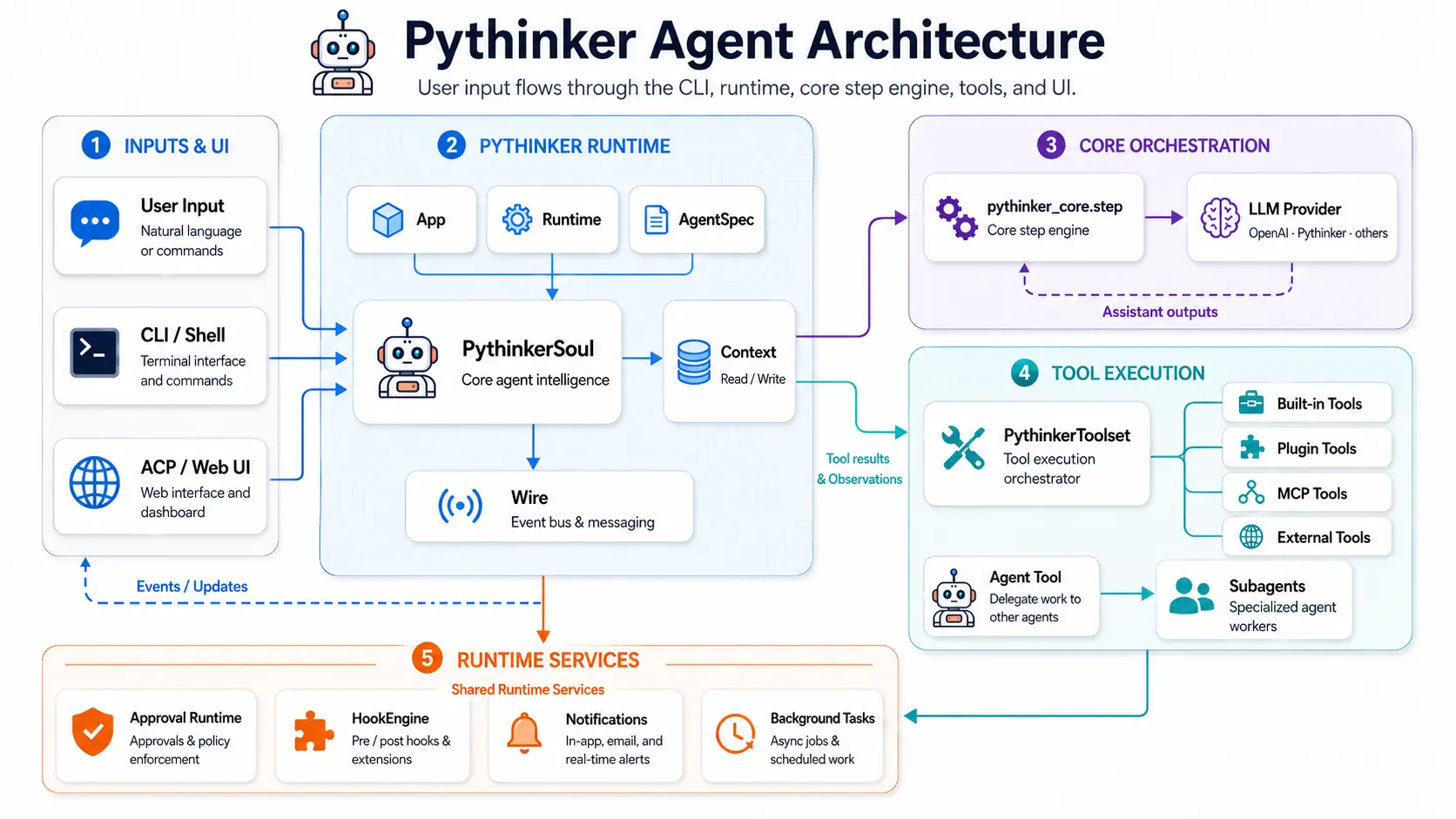
--- ## ๐Ÿ”Œ MCP Tooling Pythinker loads [Model Context Protocol](https://modelcontextprotocol.io/) tools from persistent config or ad-hoc files. Same tools, every agent โ€” no rewriting. ### ๐Ÿ› ๏ธ Manage persistent MCP servers ```sh # ๐ŸŒ Streamable HTTP server with API key pythinker mcp add --transport http context7 https://mcp.context7.com/mcp \ --header "CONTEXT7_API_KEY: ctx7sk-your-key" # ๐Ÿ” Streamable HTTP server with OAuth pythinker mcp add --transport http --auth oauth linear https://mcp.linear.app/mcp # ๐Ÿ’ป stdio server pythinker mcp add --transport stdio chrome-devtools -- npx chrome-devtools-mcp@latest # ๐Ÿ“‹ List, authorize, test, and remove pythinker mcp list pythinker mcp auth linear pythinker mcp test chrome-devtools pythinker mcp remove chrome-devtools ``` ### ๐Ÿ“„ Use an ad-hoc MCP config file ```json { "mcpServers": { "context7": { "url": "https://mcp.context7.com/mcp", "headers": { "CONTEXT7_API_KEY": "YOUR_API_KEY" } }, "chrome-devtools": { "command": "npx", "args": ["-y", "chrome-devtools-mcp@latest"] } } } ``` ```sh pythinker --mcp-config-file /path/to/mcp.json ``` --- ## ๐Ÿงฌ Extensibility Pythinker is a small, extensible runtime โ€” not a monolith. Build on it. | Extension Point | What it does | Where to look | |---|---|---| | ๐Ÿค– **Agents & subagents** | YAML specs define tools, prompts, and built-in subagent types | `src/pythinker_code/agents/` | | ๐ŸŽ“ **Skills** | `/skill:` loads reusable instructions on demand | bundled & user-defined | | ๐ŸŒŠ **Flows** | `/flow:` executes bundled prompt flows | bundled & user-defined | | ๐Ÿช **Hooks** | Observe or block tool execution; integrate policy or automation | hook events API | | ๐Ÿงฉ **Plugins** | Installable extension packages | `pythinker plugin` | --- ## ๐Ÿ—๏ธ Architecture
Pythinker Code architecture diagram
--- ## ๐Ÿ” Privacy & Telemetry Pythinker is the **agent framework**, not the LLM. You bring your own API key (OpenAI, Anthropic, your local LM Studio model, etc.); your prompts and the model's responses go directly between your terminal and the model provider you configured. Pythinker never sees, stores, or forwards them. If you opt in, Pythinker can collect a small amount of **diagnostic telemetry** about how the agent runs to improve the framework itself. It's strictly anonymous, never includes your prompts, model output, file contents, file paths, or any user-identifying data. Two channels: | Channel | What lands there | Endpoint | |---|---|---| | **Errors** (Sentry-protocol) | Unhandled exceptions and crash stack traces, with absolute paths above `site-packages/` rewritten to `/` so home directories don't leak | `errors.pythinker.com` (self-hosted Bugsink) | | **Traces + structured logs** (OpenTelemetry) | Lifecycle events (`session_started`, `started`, `model_switch`), agent-loop spans (`pythinker.turn` / `pythinker.llm` / `pythinker.tool`), and per-event counters | `otel.pythinker.com` (self-hosted SigNoz) | ### What we collect - **Lifecycle events**: session start, command-line flags actually used (booleans only), startup timing, model name (just the identifier, e.g. `claude-opus-4-7`), thinking-mode toggle, plan-mode toggle. - **Agent-loop spans**: turn duration, step count, stop reason (`no_tool_calls` / `max_steps` / `error`), tool name (`Read`, `Bash`, `Edit`, โ€ฆ), tool success/failure, tool duration, LLM call duration, input/output token *counts* (numbers โ€” never the content). - **Crashes**: exception class name, scrubbed stack trace, library versions. We do **not** send local variable values. - **Static context**: pythinker version, OS family, Python version, terminal type (`TERM_PROGRAM`), CI flag (`CI` env var presence), locale. - **A persistent, random `device_id`** so we can count "how many distinct installs" without identifying a person. ### What we never collect - Your prompts, the model's responses, or any conversation content - File contents, file paths, working directory names, or workspace structure - Your API keys, OAuth tokens, environment variables - Your real name, email, IP address, hostname (host name field is dropped at the edge collector) - Tool arguments (e.g. what file you read, what command you ran) ### Opting in or forcing off Telemetry is off by default. To enable it for a process: ```sh export PYTHINKER_ENABLE_TELEMETRY=1 pythinker ``` To force telemetry off even if another setting enabled it: ```sh # 1. Per-invocation CLI flag pythinker --no-telemetry # 2. Environment variable (works in shells, .env files, CI configs) export PYTHINKER_DISABLE_TELEMETRY=1 pythinker # 3. Permanently in your config file (~/.pythinker/config.toml) [default] telemetry = false ``` When telemetry is disabled, Pythinker short-circuits Sentry initialization, OTel exporter creation, and the in-process event sink. No network requests are made to the telemetry endpoints. ### Pointing telemetry at your own infrastructure If you operate pythinker for a team and want telemetry routed to your own SigNoz / Bugsink instead, override the endpoints via environment variables: ```sh export PYTHINKER_SENTRY_DSN="https://@your-bugsink.example.com/" export PYTHINKER_OTEL_ENDPOINT="https://your-otel-collector.example.com" export PYTHINKER_OTEL_TOKEN="" ``` The defaults point at infrastructure operated by the pythinker maintainers; set `PYTHINKER_ENABLE_TELEMETRY=1` to use them. --- ## ๐Ÿ› ๏ธ Development ### ๐Ÿ Prepare the workspace ```sh git clone https://github.com/mohamed-elkholy95/Pythinker-Code.git cd Pythinker-Code make prepare ``` ### ๐Ÿงฐ Common commands
**โ–ถ๏ธ Run & iterate** ```sh uv run pythinker # CLI from source make format # format all packages make check # lint + type-check ``` **๐Ÿงช Test** ```sh make test # all unit + e2e tests make ai-test # AI-driven tests make test-pythinker-code # CLI only make test-pythinker-core # Core only make test-pythinker-host # Host only make test-pythinker-sdk # SDK only ```
**๐ŸŒ Frontends** ```sh make web-back # web backend make web-front # web frontend make vis-back # vis backend make vis-front # vis frontend ``` **๐Ÿ“ฆ Build** ```sh make build # Python packages make build-bin # standalone binary make help # all targets ```
> ๐Ÿ’ก `make build` and `make build-bin` build and embed the web and visualization frontends before packaging. --- ## ๐Ÿ—‚๏ธ Project Layout ``` pythinker-code/ โ”œโ”€โ”€ ๐Ÿ“ฆ src/pythinker_code/ CLI runtime ยท tools ยท UIs ยท ACP ยท MCP ยท hooks ยท plugins ยท skills ยท web ยท vis backends โ”œโ”€โ”€ ๐Ÿงฑ packages/ โ”‚ โ”œโ”€โ”€ pythinker-core/ Provider-agnostic message, tool, and chat-provider abstractions โ”‚ โ”œโ”€โ”€ pythinker-host/ Local/remote host filesystem and command execution โ”‚ โ””โ”€โ”€ pythinker-code/ Console-script distribution package โ”œโ”€โ”€ ๐Ÿงฐ sdks/pythinker-sdk/ Python SDK โ””โ”€โ”€ ๐Ÿงช tests/ ยท tests_e2e/ ยท tests_ai/ Unit ยท wire/CLI e2e ยท AI-driven test suites ``` --- ## ๐Ÿค Contributing Contributions are warmly welcome โ€” bug reports, PRs, plugins, skills, and docs all help. - ๐Ÿ“– Start with [`CONTRIBUTING.md`](https://github.com/mohamed-elkholy95/Pythinker-Code/blob/main/CONTRIBUTING.md) - ๐Ÿ” See [`SECURITY.md`](https://github.com/mohamed-elkholy95/Pythinker-Code/blob/main/SECURITY.md) for responsible disclosure - ๐Ÿ“œ Skim [`AGENTS.md`](https://github.com/mohamed-elkholy95/Pythinker-Code/blob/main/AGENTS.md) for the agent design notes If Pythinker helps you, **a โญ on GitHub goes a long way.** --- ## ๐Ÿ“œ License Distributed under the **Apache-2.0 License**. See [`LICENSE`](https://github.com/mohamed-elkholy95/Pythinker-Code/blob/main/LICENSE) for the full text and [`NOTICE`](https://github.com/mohamed-elkholy95/Pythinker-Code/blob/main/NOTICE) for attributions.
**Built with โค๏ธ for engineers who live in the terminal.** [๐ŸŒ pythinker.com](https://pythinker.com)  ยท  [๐Ÿ“ฆ PyPI](https://pypi.org/project/pythinker-code/)  ยท  [๐Ÿ™ GitHub](https://github.com/mohamed-elkholy95/Pythinker-Code)  ยท  [๐Ÿงฉ ACP](https://github.com/agentclientprotocol/agent-client-protocol)  ยท  [๐Ÿ”Œ MCP](https://modelcontextprotocol.io/)