Pythinker

Pythinker

PyPI Downloads Python License

πŸ€– **Pythinker** is an open-source tiny agent framework. It keeps the core agent loop compact and readable while still supporting chat channels, long-term memory, MCP, and practical deployment paths β€” so you can go from local setup to a long-running personal agent with minimal overhead. > Powered by a tiny, multiplexing agent loop: one Python process listens to Slack, Telegram, Discord, WhatsApp, Matrix, MS Teams, email, a WebSocket WebUI, and an OpenAI-compatible HTTP API β€” all backed by a single session-scoped memory layer. > **What's new in 2.6.0** β€” New **Signal channel** (signal-cli HTTP/SSE) with full DM and group support. New **DM pairing system**: first-time senders receive a one-time code; owner approves via `/pairing approve`. Channel modules now load lazily (only enabled channels import their SDKs at startup), and the OpenAI-compatible provider client initializes on first use (~700 ms cold-start savings). `AnthropicProvider` transparently retries long requests via streaming. Shell tool detaches stdin so interactive prompts no longer block turns. See the [changelog](CHANGELOG.md) for details. ## πŸ’‘ Key Features - **Tiny agent** β€” a compact readable core. Stable long-running behavior without orchestration sprawl. - **Channel-agnostic** β€” Slack, Telegram, Discord, WhatsApp, Matrix, MS Teams, email, WebSocket, plus an OpenAI-compatible HTTP API. - **Full-screen TUI** β€” `pythinker tui` (alias `chat`) opens a `prompt_toolkit` chat with live streaming, slash-command pickers (`/model`, `/provider`, `/sessions`, `/theme`, `/help`, `/status`), fuzzy search, themable chrome (default + monochrome), and Ctrl+C cancellation of in-flight turns. - **Provider-rich** β€” 25+ LLM providers (Anthropic, OpenAI, Azure OpenAI, OpenAI Codex, GitHub Copilot, Qwen/DashScope, MiniMax, VolcEngine, Moonshot, DeepSeek, StepFun, and more) behind a single interface. - **Provider hot-reload** β€” edits to model / provider / API key in `~/.pythinker/config.json` land at the next turn boundary. No restart of the SDK or gateway. Same-signature snapshots short-circuit; broken configs are logged and swallowed so an in-flight session can't crash on a typo. - **Headless browser tool** *(opt-in)* β€” drives Playwright-managed Chromium for JavaScript-rendered pages, click/form flows, screenshots, and DOM snapshots. `mode="auto"` launches a packaged headless Chromium without Docker; `mode="cdp"` connects to an external service for hardened deployments. First-use Chromium binary installs lazily, with idle eviction, per-context page caps, SSRF route handling, and turn-boundary hot reload of browser config. - **Governed-execution runtime** *(off by default)* β€” opt-in `RuntimeConfig` wires a `PolicyService` (allow-lists from agent manifests, per-turn budgets, recursion depth), a `ToolEgressGateway` chokepoint, an `AgentRegistry` directory loader, `RequestContext` + `BudgetCounters` plumbing, and a pluggable `TelemetrySink` (loguru / JSONL / composite). When the loader is `None` and policy is off, the runtime is bit-for-bit identical to the legacy path. - **Autonomous subagent tracking** β€” spawned subagents are first-class task records with durable output under `.pythinker/task-results/`. Pick a role at spawn time β€” `coder` (full tools), `explore` (read-only navigation), or `plan` (planning-only, no write/edit/shell) β€” and use `/tasks`, `/task-output `, and `/task-stop ` to inspect or stop background work from chat. - **Memory that learns** β€” a two-phase "Dream" process consolidates long-term memory into `MEMORY.md` / `SOUL.md` / `USER.md`, auto-versioned with pure-Python git. - **Skills & MCP** β€” bundled skills (GitHub, cron, weather, tmux, summarize, skill-creator, …) plus first-class [Model Context Protocol](https://modelcontextprotocol.io/) tool access with defensive HTTP probing and provider-safe tool names. - **Research-grade PDF reports** β€” opt-in `make_pdf` tool renders structured Markdown to a styled PDF via ReportLab (`pip install 'pythinker-ai[reports]'`). - **Safer channel ingress** β€” chat/email adapters apply `allowFrom` before costly side effects like media downloads, attachment extraction, or voice transcription; Matrix also drops replayed pre-startup events. - **Sandboxed shell** β€” every command is wrapped in a bubblewrap sandbox on Linux; file tools enforce workspace boundaries. - **Hackable** β€” the Python package is ~58k LOC with zero monolithic orchestration layer. Read it, fork it, extend it. ## πŸ“¦ Install Pythinker ships **native installers for every platform** alongside the PyPI wheel. Pick the row that matches your OS β€” no Python, Node, or `uv` prerequisite for the native paths. > ⏳ **Status note (May 2026):** the native installer table below is wired and > ready, but the first set of `.exe` / `.deb` / `.rpm` / tarball / Homebrew > artifacts ships **with the v2.7.0 GitHub release**. Until that release > publishes, only the `pip install pythinker-ai` row is fully populated; the > other rows will start returning 200s as soon as v2.7.0's > `release-native.yml` workflow finishes. | Platform | One-line install | Artifact | |---|---|---| | πŸͺŸ **Windows** | Download + double-click `PythinkerSetup-2.7.0.exe` | [Releases](https://github.com/mohamed-elkholy95/Pythinker/releases/latest) *(from v2.7.0)* | | 🍎 **macOS (Apple Silicon + Intel)** | `brew install mohamed-elkholy95/pythinker/pythinker-ai` | Homebrew tap *(from v2.7.0)* | | 🐧 **Linux (Debian / Ubuntu)** | `sudo dpkg -i pythinker-ai_2.7.0_amd64.deb` | [Releases](https://github.com/mohamed-elkholy95/Pythinker/releases/latest) *(from v2.7.0)* | | 🐧 **Linux (Fedora / RHEL / openSUSE)** | `sudo rpm -i pythinker-ai-2.7.0.x86_64.rpm` | [Releases](https://github.com/mohamed-elkholy95/Pythinker/releases/latest) *(from v2.7.0)* | | 🌐 **macOS / Linux β€” curl-bash** | `curl -fsSL https://raw.githubusercontent.com/mohamed-elkholy95/Pythinker/main/scripts/install-native.sh \| bash` | tarball *(from v2.7.0)* | | 🐍 **Python fallback** (universal) | `pip install pythinker-ai` | [PyPI](https://pypi.org/project/pythinker-ai/) | Every artifact ships with a matching `.sha256` file β€” verify before install on any platform with `sha256sum`, `shasum -a 256`, or `Get-FileHash`. After install, on any OS: ```bash pythinker --version # confirm install pythinker onboard # interactive setup wizard pythinker # start the interactive CLI ``` > **In-app updates** β€” `pythinker update` queries the GitHub Releases API and > re-runs the right installer for your build with SHA-256 verification. Set > `PYTHINKER_CLI_NO_AUTO_UPDATE=1` to disable the proactive startup check. ### πŸͺŸ Windows β€” native installer `PythinkerSetup-2.7.0.exe` is an Inno Setup wizard. Installs per-user into `%LOCALAPPDATA%\Programs\Pythinker`, registers `pythinker` on your user PATH (`HKCU\Environment`), broadcasts `WM_SETTINGCHANGE` so new shells see the change. **No UAC prompt.** ```powershell # 1. Download the installer + checksum from the Releases page above. # 2. Verify the download Get-FileHash .\PythinkerSetup-2.7.0.exe -Algorithm SHA256 Get-Content .\PythinkerSetup-2.7.0.exe.sha256 # The two hashes must match. # 3. Run it .\PythinkerSetup-2.7.0.exe # 4. Open a fresh PowerShell pythinker --version ``` **Per-machine install** (IT-managed boxes): `.\PythinkerSetup-2.7.0.exe /ALLUSERS` installs to `%ProgramFiles%\Pythinker` and writes PATH to HKLM (requires admin). **Upgrade:** `pythinker update` from inside the running app β€” it downloads the newest installer, verifies SHA-256, and re-runs it silently (`/VERYSILENT /SUPPRESSMSGBOXES /NORESTART`). **Uninstall:** Apps & Features β†’ *Pythinker* β†’ Uninstall reverts both the files and the PATH edit. > πŸ›‘ **First-launch SmartScreen warning** β€” until the Authenticode cert is > provisioned in CI, the installer ships unsigned and Windows shows > *"Windows protected your PC."* Click **More info β†’ Run anyway**. Use the > published `.sha256` as your integrity check until signing comes online. ### 🍎 macOS β€” Homebrew tap ```bash # 1. Install β€” always pulls the newest pythinker-ai release on PyPI brew install mohamed-elkholy95/pythinker/pythinker-ai # 2. Verify pythinker --version which pythinker # -> /opt/homebrew/bin/pythinker (Apple Silicon) # or /usr/local/bin/pythinker (Intel) ``` Works on **Apple Silicon and Intel** β€” brew picks the right Python build for you. The formula provisions a clean venv and installs `pythinker-ai` unpinned, so every fresh `brew install` resolves the newest release on PyPI; the tap also auto-republishes its `url`/`sha256` block on every Pythinker release so `brew info` reflects the current version. **Upgrade:** `brew upgrade pythinker-ai` works once the tap has refreshed for the new release. To pick up a PyPI point release immediately (between tap refreshes), `brew reinstall pythinker-ai`. **Uninstall:** `brew uninstall pythinker-ai && brew untap mohamed-elkholy95/pythinker`. > The tap repo is [mohamed-elkholy95/homebrew-pythinker](https://github.com/mohamed-elkholy95/homebrew-pythinker) β€” auto-maintained, do not hand-edit. ### 🐧 Linux β€” system packages Native `.deb` and `.rpm` packages for both `x86_64` and `aarch64` are attached to every GitHub Release. ```bash # Debian / Ubuntu (x86_64) sudo dpkg -i pythinker-ai_2.7.0_amd64.deb sudo apt-get install -f # only if dpkg reports missing deps # Debian / Ubuntu (ARM64) sudo dpkg -i pythinker-ai_2.7.0_arm64.deb # Fedora / RHEL / openSUSE (x86_64) sudo rpm -i pythinker-ai-2.7.0.x86_64.rpm # or use the package manager (preferred β€” handles deps): sudo dnf install ./pythinker-ai-2.7.0.x86_64.rpm sudo zypper install ./pythinker-ai-2.7.0.x86_64.rpm # Fedora / RHEL (aarch64) sudo rpm -i pythinker-ai-2.7.0.aarch64.rpm ``` Both packages drop a small `/usr/bin/pythinker` launcher that execs the real binary under `/usr/lib/pythinker/`, so your `$PATH` stays tidy. **Verify before install:** ```bash sha256sum -c pythinker-ai_2.7.0_amd64.deb.sha256 # Debian/Ubuntu sha256sum -c pythinker-ai-2.7.0.x86_64.rpm.sha256 # Fedora/RHEL ``` **Upgrade:** download the new `.deb`/`.rpm` from Releases and `dpkg -i` / `dnf install` over it. Or run `pythinker update` from inside the running app β€” it'll fetch the matching new package and prompt for sudo to install. **Uninstall:** ```bash sudo dpkg -r pythinker-ai # Debian/Ubuntu sudo rpm -e pythinker-ai # Fedora/RHEL ``` ### 🌐 macOS / Linux β€” curl-bash native installer For containers, fresh VMs, or any host without a system package manager. The [install-native.sh](./scripts/install-native.sh) helper detects your OS + arch, downloads the matching PyInstaller-frozen tarball, verifies its SHA-256, and lands the single binary at `~/.local/bin/pythinker`. ```bash # Latest release curl -fsSL https://raw.githubusercontent.com/mohamed-elkholy95/Pythinker/main/scripts/install-native.sh | bash # Pin a specific version curl -fsSL https://raw.githubusercontent.com/mohamed-elkholy95/Pythinker/main/scripts/install-native.sh \ | bash -s -- --version 2.7.0 # Custom prefix (defaults to $HOME/.local) curl -fsSL ...install-native.sh | bash -s -- --prefix /opt/pythinker ``` Supported targets: | `uname -s / -m` | Tarball asset | |---|---| | Linux / x86_64 | `pythinker-2.7.0-x86_64-unknown-linux-gnu.tar.gz` | | Linux / aarch64 | `pythinker-2.7.0-aarch64-unknown-linux-gnu.tar.gz` | | Darwin / arm64 | `pythinker-2.7.0-aarch64-apple-darwin.tar.gz` | The script prints PATH guidance if `~/.local/bin` isn't already on your `$PATH`. Intel macOS users β€” use Homebrew or `pip install pythinker-ai`; no PyInstaller-built Intel Darwin binary is published. **Uninstall:** `rm ~/.local/bin/pythinker`. ### πŸ›  Power-user / legacy install paths > 🚧 **Deprecated.** These paths still work, but the per-OS native installers > above are the canonical install method for **all new releases**. The legacy > options below remain for existing automation; new tooling, examples, and > support docs target the native installers exclusively.
Legacy uv / pipx / pip / source paths ```bash # uv (one-off run) uvx pythinker-ai # uv tool install (isolated env) uv tool install pythinker-ai # pipx (equivalent to uv tool install, slower): pipx install pythinker-ai # Plain pip (last resort β€” you may need to add ~/.local/bin to PATH): pip install --user pythinker-ai # From source (contributors only): git clone git@github.com:mohamed-elkholy95/Pythinker.git cd Pythinker && uv sync --all-extras ``` If `pythinker` isn't found after install, run `pythinker doctor` (via `python -m pythinker doctor` if needed) for diagnostics. The legacy `scripts/install.sh` and `scripts/install.ps1` wrappers print a deprecation banner; set `PYTHINKER_INSTALL_QUIET_DEPRECATION=1` to silence it.
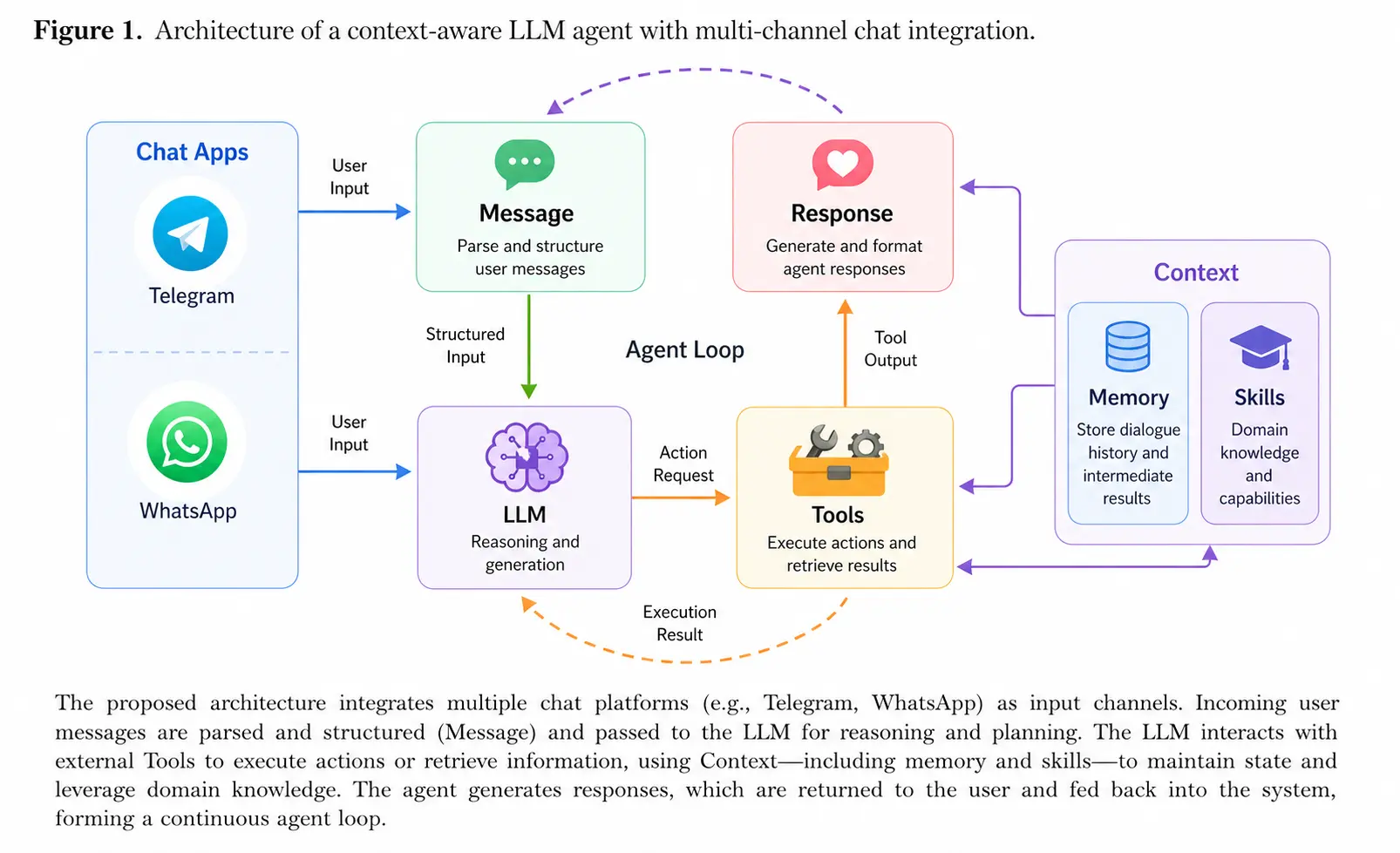
### 3. Optional extras Pythinker ships with the Python browser automation library needed by the `browser` tool. Optional extras are for add-on channels and heavier document features: ```bash uv tool install 'pythinker-ai[reports]' # Markdown β†’ PDF reports (research/report deliverables) uv tool install 'pythinker-ai[matrix]' # Matrix channel (E2E messaging) uv tool install 'pythinker-ai[discord]' # Discord channel uv tool install 'pythinker-ai[msteams]' # Microsoft Teams channel uv tool install 'pythinker-ai[pdf]' # Read PDF files (PyMuPDF) uv tool install 'pythinker-ai[api]' # OpenAI-compatible HTTP server # Combine: uv tool install 'pythinker-ai[reports,discord,api]' ``` The historical `pythinker-ai[browser]` extra is still accepted as a compatibility alias, but it no longer adds packages. Enable the browser tool in config with `tools.web.browser.enable=true`; the managed Chromium binary is installed lazily on first browser use when allowed, or explicitly with `python -m playwright install chromium`. ### 4. Install / pin a specific version `pythinker-ai` follows [SemVer](https://semver.org/) β€” major-version upgrades **are not** auto-installed. To pin or to opt into a major bump, use the explicit pin form for your install method: | Goal | Command | |---|---| | Pin exactly `2.0.0` (uv tool β€” recommended) | `uv tool install --reinstall "pythinker-ai==2.0.0"` | | Pin exactly `2.0.0` (pipx) | `pipx install --force "pythinker-ai==2.0.0"` | | Pin exactly `2.0.0` (plain pip) | `python -m pip install --force-reinstall "pythinker-ai==2.0.0"` | | Stay at the latest stable release | `pythinker upgrade` | | From inside pythinker, target a specific version | `pythinker update --target 2.0.0 -y` | `pip install -U pythinker-ai==2.0.0` works too, but it's semantically noisy: the **exact pin** controls the version, not `-U`. `pythinker upgrade` will refuse to cross a major version (e.g. `1.x β†’ 2.x`) without an explicit `pythinker update --target` opt-in. ## πŸš€ Quick Start ```bash pythinker onboard # write a config at ~/.pythinker/config.json pythinker provider login openai-codex # OAuth sign-in (the default provider) pythinker agent # interactive CLI chat pythinker tui # full-screen interactive chat (alias: chat) ``` `pythinker onboard` ships a config preconfigured for **OpenAI Codex via ChatGPT OAuth** (no API key needed). To use a different provider/model, edit `~/.pythinker/config.json` β€” see [Configuration](https://github.com/mohamed-elkholy95/Pythinker-ai/blob/main/docs/configuration.md) for the full catalog of 25+ providers. Want several independent agents on one host? `pythinker agents` lays out per-agent configs under `~/.pythinker/agents//` with isolated workspace, history, and memory; pass `--agent ` to any subcommand to target one. - Want different LLM providers, web search, MCP, security settings, or more config options? See [Configuration](https://github.com/mohamed-elkholy95/Pythinker-ai/blob/main/docs/configuration.md). - Want to run Pythinker in chat apps like Telegram, Discord, Slack, WhatsApp, or Matrix? See [Chat Apps](https://github.com/mohamed-elkholy95/Pythinker-ai/blob/main/docs/chat-apps.md). - Want Docker or Linux service deployment? See [Deployment](https://github.com/mohamed-elkholy95/Pythinker-ai/blob/main/docs/deployment.md). - Want governed-execution (policy allow-lists, budgets, telemetry) for hardened deployments? See [Architecture Β§5.X β€” `pythinker/runtime/`](https://github.com/mohamed-elkholy95/Pythinker-ai/blob/main/docs/ARCHITECTURE.md). The layer is opt-in via `runtime.policyEnabled` in `config.json`. ## 🧠 Agent Runtime Controls Pythinker can launch subagents for background coding, research, and maintenance work. The runtime now tracks those subagents as autonomous tasks instead of relying on chat text alone. | Command | What it does | |---|---| | `/tasks` | List active and recent autonomous tasks for the current session | | `/task-output ` | Show the latest bounded output tail for a task | | `/task-stop ` | Cancel a running subagent by id | Task output is written to `.pythinker/task-results/`, so large results do not flood the conversation and recovered output can still be inspected after a process restart. In-memory records are session-scoped; restart-recovered orphan output is workspace-wide by design for Pythinker's single-user/local deployment model. ## πŸ–₯️ TUI `pythinker tui` (alias `pythinker chat`) opens a full-screen `prompt_toolkit` interface for interactive sessions β€” a step up from `pythinker agent`'s line-by-line REPL. ```bash pythinker tui # opens with the default theme pythinker tui --theme monochrome # high-contrast / accessibility-friendly pythinker tui --workspace ~/work/agent # override per-session workspace pythinker tui --logs ~/.pythinker/tui.log # mirror loguru output to a file ``` **Layout.** A persistent chat pane (streamed assistant tokens render live with markdown swap-in once the turn ends), a status bar showing session/model/provider/iteration count, a hint footer for the current keymap, and a multiline editor with slash-command autocomplete. **Slash commands.** Open in-app overlays for everything you'd normally configure on the CLI: | Command | Opens | |---|---| | `/help` | Built-in cheat sheet | | `/status` | Live snapshot β€” session key, model, provider, message count, recent activity | | `/sessions` | Fuzzy-pick from past sessions and resume | | `/model` | Fuzzy-pick a model from the active provider | | `/provider` | Switch LLM provider | | `/theme` | Swap between `default` and `monochrome` themes (persisted to `cli.tui.theme`) | | `/mcp` | Show MCP status β€” configured servers, connected servers, registered tools; `/mcp reconnect` reloads MCP config and reconnects | | `/login` / `/logout` | OAuth sign-in / sign-out for providers like OpenAI Codex and GitHub Copilot, with in-terminal prompts | | `/init` | Generate a tuned `AGENTS.md` for the current workspace from the bundled template | | `/clear` | Clear the chat pane (`/clear --hard` also wipes session memory) | | `/exit` | Quit | Pickers support fuzzy search β€” start typing to filter, ↑/↓ to navigate, Enter to commit, Esc to dismiss. **Keymap.** | Key | Action | |---|---| | `Enter` | Submit message | | `Ctrl+J` | Newline inside the editor | | `Ctrl+C` | Cancel the in-flight turn (or quit when idle) | | `Esc` | Close the active overlay / picker | | `↑` / `↓` | Move cursor in pickers; PageUp / PageDown for 5-step jumps | **Theming.** Two themes ship by default. Set `cli.tui.theme` in `~/.pythinker/config.json` or pass `--theme`. Both themes provide separate prompt_toolkit chrome styles and Rich content styles so the chat panel and the surrounding UI stay visually consistent. ## πŸ§ͺ WebUI (Development) > [!NOTE] > The WebUI development workflow currently requires a source checkout and is not yet shipped together with the official packaged release. See the [WebUI README](https://github.com/mohamed-elkholy95/Pythinker-ai/blob/main/webui/README.md) for full WebUI development docs and build steps. **1. Enable the WebSocket channel in `~/.pythinker/config.json`** ```json { "channels": { "websocket": { "enabled": true } } } ``` **2. Start the gateway** ```bash pythinker gateway ``` **3. Start the WebUI dev server** ```bash cd webui bun install bun run dev ``` ## πŸ—οΈ Architecture

Pythinker architecture

πŸ€– Pythinker stays tiny by centering everything around a tiny agent loop: messages come in from chat apps, the LLM decides when tools are needed, and memory or skills are pulled in only as context instead of becoming a heavy orchestration layer. That keeps the core path readable and easy to extend, while still letting you add channels, tools, memory, and deployment options without turning the system into a monolith. See [`docs/ARCHITECTURE.md`](https://github.com/mohamed-elkholy95/Pythinker-ai/blob/main/docs/ARCHITECTURE.md) for a forensic walkthrough of the runtime. ## ✨ Features

πŸ“ˆ 24/7 Real-Time Market Analysis

πŸš€ Full-Stack Software Engineer

πŸ“… Smart Daily Routine Manager

πŸ“š Personal Knowledge Assistant

Discovery β€’ Insights β€’ Trends Develop β€’ Deploy β€’ Scale Schedule β€’ Automate β€’ Organize Learn β€’ Memory β€’ Reasoning
## πŸ“š Docs Browse the [repo docs](https://github.com/mohamed-elkholy95/Pythinker-ai/blob/main/docs/README.md) for the current GitHub development version. - Talk to Pythinker from familiar chat apps: [Chat Apps](https://github.com/mohamed-elkholy95/Pythinker-ai/blob/main/docs/chat-apps.md) - Configure providers, web search, MCP, and runtime behavior: [Configuration](https://github.com/mohamed-elkholy95/Pythinker-ai/blob/main/docs/configuration.md) - Integrate Pythinker with local tools and automations: [OpenAI-Compatible API](https://github.com/mohamed-elkholy95/Pythinker-ai/blob/main/docs/openai-api.md) Β· [Python SDK](https://github.com/mohamed-elkholy95/Pythinker-ai/blob/main/docs/python-sdk.md) - Run Pythinker with Docker or as a Linux service: [Deployment](https://github.com/mohamed-elkholy95/Pythinker-ai/blob/main/docs/deployment.md) - Deeper dives: [Architecture](https://github.com/mohamed-elkholy95/Pythinker-ai/blob/main/docs/ARCHITECTURE.md) Β· [Memory](https://github.com/mohamed-elkholy95/Pythinker-ai/blob/main/docs/memory.md) Β· [Multiple Instances](https://github.com/mohamed-elkholy95/Pythinker-ai/blob/main/docs/multiple-instances.md) Β· [Channel Plugin Guide](https://github.com/mohamed-elkholy95/Pythinker-ai/blob/main/docs/channel-plugin-guide.md) ## 🀝 Contribute & Roadmap PRs welcome! The codebase is intentionally small and readable. πŸ€— ### Branching Strategy | Branch | Purpose | |--------|---------| | `main` | Stable releases β€” bug fixes and minor improvements | | `dev` | Experimental features β€” new features and breaking changes | **Unsure which branch to target?** See [CONTRIBUTING.md](https://github.com/mohamed-elkholy95/Pythinker-ai/blob/main/CONTRIBUTING.md) for details. **Releases** β€” When publishing a new version, keep the README β€œWhat's new” callout and [CHANGELOG.md](https://github.com/mohamed-elkholy95/Pythinker-ai/blob/main/CHANGELOG.md) section in sync with the exact release version. **Roadmap** β€” Pick an item and [open a PR](https://github.com/mohamed-elkholy95/Pythinker-ai/pulls)! - **Multi-modal** β€” See and hear (images, voice, video) - **Long-term memory** β€” Never forget important context - **Better reasoning** β€” Multi-step planning and reflection - **More integrations** β€” Calendar and more - **Self-improvement** β€” Learn from feedback and mistakes ## πŸ” Security Found a vulnerability? Please **do not open a public issue**. Follow the private disclosure process in [`SECURITY.md`](https://github.com/mohamed-elkholy95/Pythinker-ai/blob/main/SECURITY.md). ## πŸ“„ License Pythinker is released under the [MIT License](https://github.com/mohamed-elkholy95/Pythinker-ai/blob/main/LICENSE). Third-party components redistributed with the project are listed in [`THIRD_PARTY_NOTICES.md`](https://github.com/mohamed-elkholy95/Pythinker-ai/blob/main/THIRD_PARTY_NOTICES.md).

Thanks for visiting ✨ Pythinker!

Visitors